Data Management
Understanding the different types of storage available on MCMeSU is crucial for efficient data management and job execution. Here’s an overview of the three storage : HOME, SCRATCH, and STORE.
HOME Storage
HOME storage is the landing space of a user connection to MCMeSU, each user owns a dedicated directory /home/$USER or $HOME.
Characteristics
- Fair Performance : Designed to allow a large number of simultaneous lightweight tasks like preparing scripts, editing files, and submitting jobs.
- Small capacity : Users are expected to store less than 100 GB in their HOME.
- Security : This storage is secured and made redundant.
Use-case Examples
- Job submission scripts ;
- Personal configuration files (e.g.,
.bashrc,.profile) ; - Source code for applications.
SCRATCH Storage
SCRATCH storage is designed to be a high-performance temporary workspace, each user owns a dedicated directory /scratch/$USER or $SCRATCH
Characteristics
- High Performance : Designed for fast read/write operations, crucial for intensive computational jobs.
- Large Capacity : Typically more spacious than other storage types to accommodate large-scale operations.
- Temporary : Old files (>3 months old) on scratch storage can be automatically purged without notice to free up space, do not store important unused data here.
Use-case Examples
- Intermediate data from simulations or analyses.
- Temporary files and job outputs.
- Results not yet saved elsewhere.
STORE Storage
STORE storage is intended for long-term storage of large amounts of data, each user owns a dedicated directory /store/$USER or $STORE.
Characteristics
- Archiving : Store data that needs to be preserved after processing, such as final results from simulations or research projects.
- Large Capacity : Optimized for massive storage capacity at the expense of read/write performance.
- Security : This storage is secured and made redundant.
Use-case Examples
- Final project results.
- Raw data collected for future analysis.
- Backups of code and configurations.
Moving data to STORE
For moving large datasets, we recommend using rsync.
It is a powerful tool used to copy and synchronize files between different locations, either locally or over a network.
To move your data safely, here's a sequence of commands you may follow. We'll assume that you're backing up a sub-directory in your SCRATCH named "mydata".
First, we set up a destination directory :
cd "$STORE"
mkdir backup-scratch
cd backup-scratch
Then, we use rsync to copy the sub-directory from the SCRATCH to the STORE :
rsync -arv --progress "$SCRATCH/mydata/" .
If you interrupt the transfer or want to ensure that data has been copied, you can repeat the same command (only the missing data will be transferred).
Finally, when rsync is done, we can delete the copied data :
cd "$SCRATCH"
rm -rf mydata
Note that the rsync command can be aborted at any time if required.
You can carry out the transfer several times, as long as you use the same command each time.
Summary
To help you visualize these concepts, here’s a summary table:
| Type of Storage | Primary Use-case | Characteristics | Examples of Content |
|---|---|---|---|
| HOME | Configuration and preparation | Small capacity, fair performance, secured | Job scripts, config files |
| SCRATCH | Intensive and temporary computations | High performance, purged, no redundancy | Intermediate data, job outputs |
| STORE | Long-term storage and archiving | Large capacity, low performance, secured | Final results, backups, raw data |
Process of using your data on MCMeSU
1. Sending your data and script in your HOME storage, STORE storage or directly to your SCRATCH storage using scp or sftp.

2. After preparing your job, transfer all the files you need for your job on the SCRATCH storage (you can organise or compile your code from your HOME, SCRATCH or STORE directory).

3. Start your script with sbatch from SCRATCH, it is optimized for fast transfer and computation.
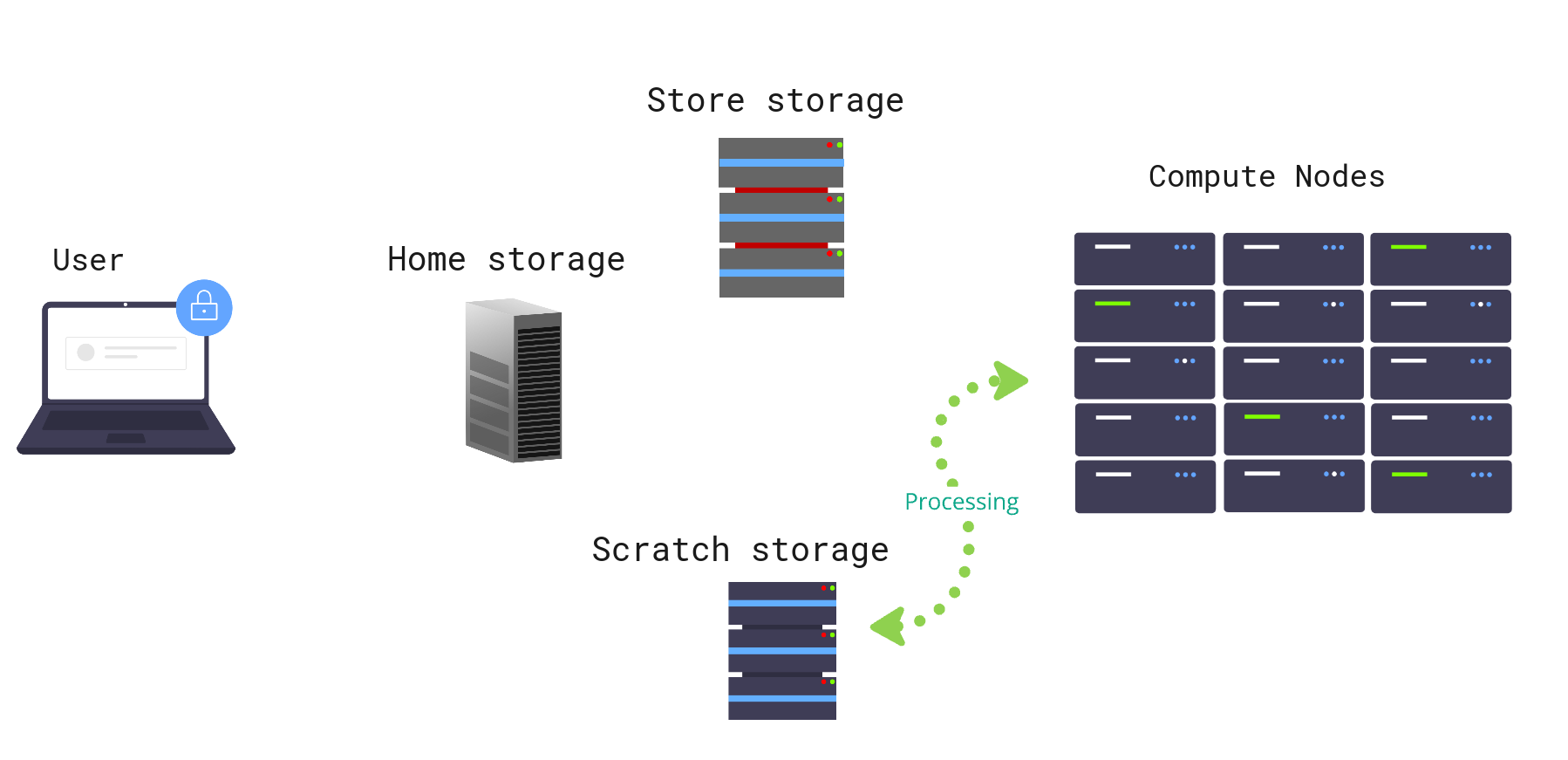
4. Once your job is done, you can find your results in SCRATCH. Transfer some results and scripts files in your HOME storage if need adjustements to start another job, or to the STORE storage if you want to save your results.

Best Practices
- Appropriate Use: Utilize each type of storage for its intended purpose. Avoid keeping important files on SCRATCH storage.
- Monitoring: Regularly monitor the space you use in SCRATCH storage to avoid data loss due to purges (for example:
du -hs $SCRATCH). - Regular Backups: Backup important data on STORE storage or other external means to safeguard against accidental losses.
These different types of storage are designed to offer you flexibility and performance. Each has a specific role that, when properly understood and utilized, can greatly enhance your efficiency and data management.
Data Usage Report
Storage spaces of MCMeSU are continually monitored.
Using the mydata command, you can get a report of your storage occupation :
[user1@mc-login1]$ mydata

Data storage report of user

HOME    : 8.3 GB  [0.0% of total capacity]
SCRATCH : 2.1 TB  [0.5% of total capacity]
STORE   : 8.6 TB  [1.2% of total capacity]

Last refresh : 2026-02-25 15:01:58
In case we notice an unusual storage usage, we will get in touch with you.